
Quick answer: The exchange rate you see in the Remitly app can depend on your transfer, including how much you send, how you pay, and whether an offer applies. You may see rate information on Home before you start. As you set up your transfer, check the rate together with any fees, how much you’ll pay, how much your recipient will receive, and when the money is expected to arrive.
When you send money to another country, the exchange rate helps determine how much your recipient will receive. But you may see more than one rate as you use the Remitly app. For example, you might see a rate on Home and then see updated information after entering an amount or choosing how you want to pay. Here’s what the exchange rate in the Remitly app means, why the rate you see can depend on your transfer, and what to check before you send.
What is an exchange rate?
An exchange rate tells you how much one currency is worth in another currency.
For example, if you’re sending US dollars and your recipient will receive Mexican pesos, the exchange rate helps determine how many pesos they receive for the dollars you send.
The exchange rate is one important part of your transfer, but it isn’t the only number to check. Any fees and the amount your recipient will receive also help you understand the full transfer.
Where can you see exchange rates in the Remitly app?
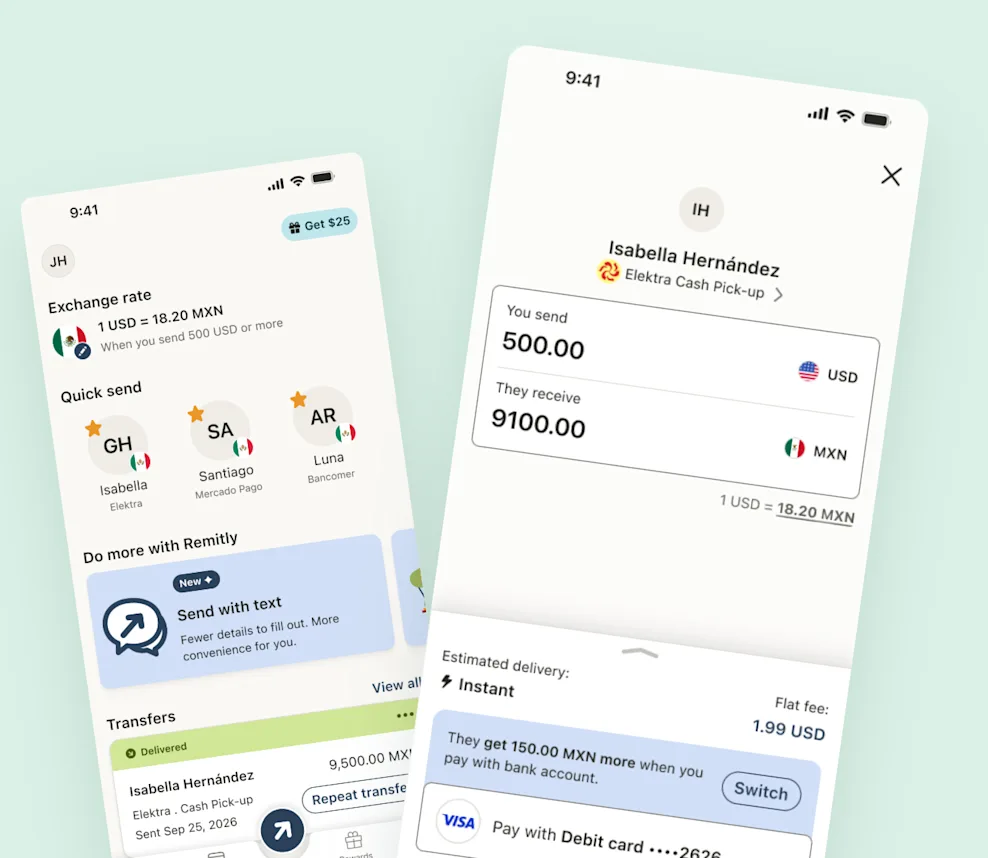
You can see exchange-rate information at different points as you use the app.
On Home
You may see a relevant exchange rate on Home before you start a transfer.
Look at the information shown with the rate. A rate may depend on something specific, such as how you pay or how much you send.
Think of the rate on Home as a useful place to start. You’ll see the details for your own transfer as you continue.
While setting up your transfer
Once you start a transfer, enter how much you want to send and review the choices available to you.
The rate you see can reflect the choices you’ve made. For example, paying from a bank account may have a different rate from paying by card.
If you change something, check the updated information before continuing.
Before you send
Before confirming your transfer, review the exchange rate along with the rest of your transfer details.
Check:
- How much you’re sending
- The exchange rate
- Any fees
- How much you’ll pay
- How much your recipient will receive
- When the money is expected to arrive
This gives you a fuller picture than looking at the exchange rate by itself.
Why might you see a different exchange rate?
The rate available for your transfer can depend on the choices you make in the Remitly app.
How much you send
A rate may be available when you send at least a certain amount.
If a rate has an amount requirement, look for that information in the app. You don’t need to send more than you planned just to qualify for a particular rate. Choose an amount that works for you and review the transfer details that apply.
How you pay
How you pay can also affect the exchange rate.
For example, a transfer paid from a bank account may have a different rate from one paid by card.
Don’t compare the exchange rate alone. Different ways to pay can also have different fees, steps, or expected delivery times.
Offers available to you
An offer may also affect the exchange rate you receive.
If an offer applies, check its details so you understand how it works and whether there are any conditions.
The information shown for your transfer in the app will tell you what applies to you.
Don’t look at the exchange rate alone
It’s easy to focus on the exchange rate because it’s one of the most visible numbers in an international money transfer.
But a rate by itself doesn’t tell you everything you need to know.
When comparing the options available in the Remitly app, look at the full transfer:
- Exchange rate: The rate used to convert the money you’re sending into the currency your recipient receives.
- Fees: Any Remitly transfer fee that applies.
- Total cost: How much you’ll pay for the transfer.
- Recipient amount: How much your recipient will receive.
- Expected delivery: When the money is expected to arrive.
Looking at these details together can help you understand what you’re paying and what your recipient is getting.
Check the rate again if you change your transfer
If you change part of your transfer, check the exchange rate and other details again.
For example, changing how much you send or how you pay may affect the rate or fee available for your transfer.
The important thing is to review the latest information shown in the Remitly app rather than assuming the details you saw earlier are still the same.
Review everything before you send
Before you confirm a transfer, take a moment to check that everything matches what you intended.
Make sure you have the right recipient and amount. Then check the exchange rate, fees, how you’re paying, how much your recipient will receive, and when the money is expected to arrive.
If something isn’t what you expected, go back and review your choices before sending.
Know what you’re looking at before you send
Understanding an exchange rate doesn’t have to mean becoming a currency expert.
When you use the Remitly app, focus on the information that matters for your transfer: the rate, any fees, how much you’ll pay, how much your recipient will receive, and when the money is expected to arrive.
And if you change how much you’re sending or how you’re paying, check the details again before you send.
Open the Remitly app to see the rate and options available for your transfer.
Frequently Asked Questions (FAQs)
Why might the exchange rate change when I’m setting up a transfer?
The rate available to you can depend on details such as how much you’re sending, how you’re paying, and whether an offer applies. If you change part of your transfer, check the updated rate and other details in the app.
Is the exchange rate on Home always the rate I’ll get?
Not necessarily. A rate shown on Home may have conditions, such as how you pay or how much you send. Check the information shown with the rate and review your transfer details before sending.
Does sending more money always give me a better exchange rate?
No. Some rates may be available when you send at least a certain amount, but that doesn’t mean sending more will always give you a better rate. Check the rate shown for the amount you actually want to send.
Can how I pay change my exchange rate?
It can. For example, a bank-funded transfer may have a different rate from a card-funded transfer. Compare the rate together with any fees and expected delivery information.