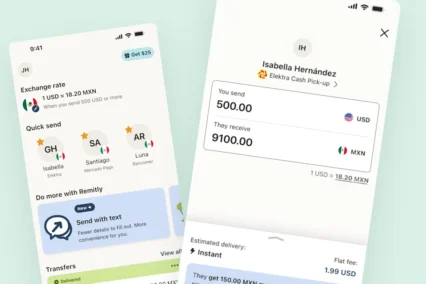

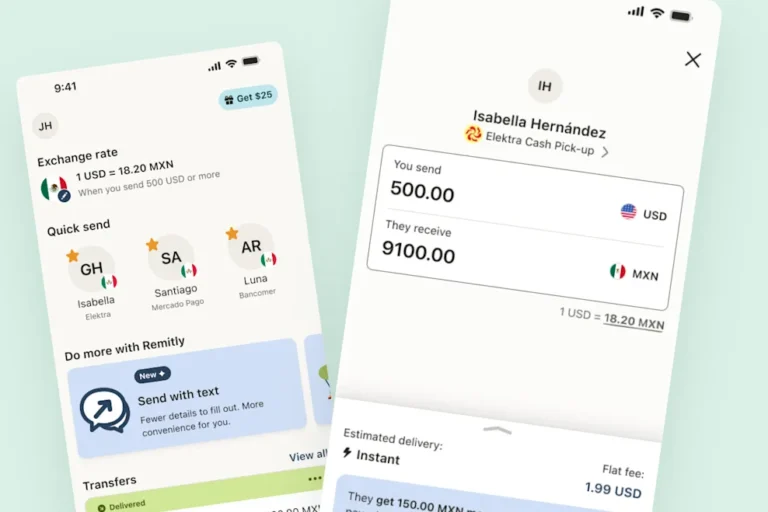
Quick answer: The refreshed Remitly app makes it easier to find the people you send money to, return to an unfinished transfer, review important details, and check your transfer after you send. Start with Home, where you can find many of the things you use most often. Depending on what’s available for your account, you may also see features like Quick Send, favorites, drafts, and a simpler way to review your transfer.
If you’ve opened the Remitly app recently, you may have noticed that some things look different.
The refreshed app brings more of the things you use regularly within easy reach. You can find people you’ve sent money to before, return to a transfer you haven’t finished, see useful exchange-rate information, and find out when something needs your attention.
You don’t need to learn everything at once. These tips can help you get familiar with the refreshed Remitly app and find the features you’ll use most.

Start with Home
Home is a good place to start when you open the Remitly app. Here, you can see:
- People you’ve sent money to before
- Quick Send for starting another transfer
- Favorites you’ve chosen
- Drafts of transfers you haven’t finished
- Exchange-rate information
- Transfers or account tasks that need your attention
Think of Home as the place to see what you might want to do next. From there, you can start another transfer, return to one you’ve already started, or check on money you’ve sent.
Keep the people you send to easy to find
If you often send money to the same people, you can start with a saved recipient from Home.
Quick Send gives you a more direct way to choose someone you’ve sent to before and start another transfer. Their saved information will be available where applicable, so you don’t have to start from scratch each time. You can also mark the people you send to regularly as favorites. This can make it easier to find the right person if you have several saved recipients.
Look for useful exchange-rate information
You may see exchange-rate information on Home before you start a transfer.
The rate available to you can depend on things such as how much you send, how you pay, and whether an offer applies. If there are conditions for a rate you see on Home, check the information shown with it.
Once you start your transfer, review the rate again as you choose your amount and how you want to pay. Before you send, check the final exchange rate, any fees, how much you’ll pay, and how much your recipient will receive.
Pick up where you left off
You don’t always have time to finish a transfer in one go.
If you start a transfer and come back later, you may see it saved as a draft on Home. Information such as the recipient, amount, or destination can help you recognize the transfer you want to continue.
A draft doesn’t mean you’ve sent the money. It also doesn’t lock in the exchange rate you saw when you started.
When you return to a draft, check the latest exchange rate, fees, and other details before you send. If you no longer need the draft, you can remove it.

Review your transfer before you send
For some transfers, the Remitly app gives you a simpler place to review and change your transfer details. This is called the Hub.
The Hub keeps important information together, including how much you’re sending, who you’re sending to, and how you’re paying. This makes it easier to check your transfer before you continue.
The Hub is currently available in the United Kingdom and Australia and on selected routes from the United States, Canada, and Europe. What you see may depend on where you’re sending money and your account.
Make changes without starting over
Spot something you want to change before sending?
For transfers that use the Hub, you can go to the detail you want to edit, make your change, and return to your transfer. For example, you may want to change the amount you’re sending or choose a different way to pay.
After making a change, check your transfer again. Changing the amount or how you pay may also change the exchange rate, fees, or expected delivery time.
Check Home when something needs your attention
Sometimes Remitly may need more information from you before a transfer can move forward.
If that happens, you may see a prompt in the app explaining what you need to do next. Open it and follow the instructions provided.
For example, you may be asked to provide some information or upload a document. Make sure the information you provide is accurate and that any document you upload is complete and easy to read.
After you respond, Remitly may need some time to review the information. We may also ask you for additional documentation. Check the app for the latest update.
Know where to find your account settings
Not everything you need to do in the Remitly app is about a transfer.
Tap your profile avatar when you want to find your account information and profile settings.
This gives account management its own place while keeping Home focused on the things you may do more often, such as starting or checking a transfer.
Check your transfer after you send
Once you’ve sent money, you can return to the Remitly app to see how your transfer is going.
Open the transfer from Home or your transfer history to see its latest available status and other details.
The updates you see can depend on how your recipient is getting the money. For example, with cash pickup, ready for pickup means the money is available for your recipient to collect. It doesn’t mean they’ve collected it yet.
If something needs your attention, follow the instructions shown for that transfer in the app.
Get comfortable with the app at your own pace
You don’t need to learn every part of the refreshed Remitly app before your next transfer.
Start with Home and the things you already do. Find the person you want to send money to, check the information shown for your transfer, and review everything carefully before you send.
As you use the app, features such as Quick Send, favorites, drafts, and the Hub can make familiar tasks easier to find and complete.
And after you’ve sent money, you can come back to the app to check your transfer and see if there’s anything you need to do.
Open the Remitly app to see what’s available to you.

Frequently Asked Questions
Where should I start in the refreshed Remitly app?
Start with Home. Depending on what’s available for your account, you may see saved recipients, Quick Send, favorites, unfinished transfers, exchange-rate information, and anything that needs your attention.
How do I find someone I’ve sent money to before?
Look for your saved recipients on Home. Quick Send can give you a direct way to start another transfer with someone you’ve sent to before. You can also mark people you send to regularly as favorites.
Can I continue a transfer I didn’t finish?
If your unfinished transfer appears as a draft on Home, you can open it and continue. Check the latest transfer details before sending.
Does a draft save my exchange rate?
No. A draft doesn’t lock in an exchange rate. Check the current rate when you return to your transfer.
Can I change something before I send?
For transfers using the Hub, you can go to the detail you want to change and then return to your transfer. Check the updated information afterward because a change may affect the rate, fees, or expected delivery time.
Where can I check my transfer after sending?
Open your transfer from Home or your transfer history to see the latest available status and any next steps.