

Quick answer: To track a money transfer in the Remitly app, open your transfer from Home or your transfer history. You’ll see the latest available status and other details about your transfer. If Remitly needs something from you, follow the instructions shown in the app.
Once you’ve sent money, it’s natural to want to know what happens next. Has the transfer gone through? When should the money arrive? Does your recipient need to do anything?
The Remitly app gives you a place to check your transfer and see its latest available status. Here’s how to find your transfer, understand the information you’re seeing, and know when you need to take action.
Find your transfer in the Remitly app
Start by opening the Remitly app.
You can open a transfer from Home or go to your transfer history to find the transfer you want to check.
Select the transfer to see its latest available status and other details. This is also where you can return if your recipient asks for an update or you want to check whether anything has changed.
If you’re looking for an older transfer, your transfer history can help you find it.

Check the latest status
Your transfer status helps you understand where the money is in the process. The exact information you see can depend on the transfer and how your recipient is getting the money.
The important thing is to read the latest status together with any instructions shown in the app. This can help you understand whether the transfer is still moving forward, has reached the next stage, or needs something from you.
If there’s no action for you to take, you may simply need to wait for the next update.
Check when the money is expected to arrive
The Remitly app also shows expected delivery information for your transfer.
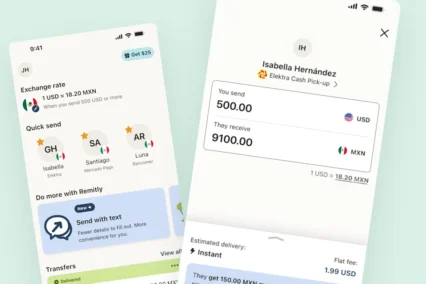
When you’re setting up a transfer, look at the expected delivery time along with the exchange rate, fees, and how much your recipient will receive.
The timing can depend on things such as:
- How you pay
- Where you’re sending money
- How your recipient receives the money
- The bank or other company receiving the transfer
- Any checks that may be needed
If you change an important part of your transfer before sending, check the expected delivery information again.
After you’ve sent the money, use the latest information in the app to follow its progress.
Remember that an estimated delivery time is an estimate
An expected delivery time can help you and your recipient plan, but it isn’t a promise that every transfer will arrive at an exact time.
Payment processing, additional checks, and the receiving bank or other provider can affect when the money arrives.
That’s why it’s useful to check your transfer in the Remitly app after sending instead of relying only on the estimate you saw when setting it up.
Know what “ready for pickup” means
If your recipient is collecting cash, pay close attention to the status shown in the app.
Ready for pickup means the money is ready for your recipient to collect. It doesn’t mean they’ve collected it yet.
This distinction can help you avoid telling your recipient that the transfer is complete before they’ve actually picked up the money.
Check the transfer for the latest information and any instructions your recipient may need.

Look for anything you need to do
Sometimes Remitly may need more information before a transfer can continue.
If your transfer needs your attention, the app can show you what to do next. Follow the instructions for that transfer rather than guessing what might be needed.
You may be asked to provide information or upload a document. If you’re uploading a document, make sure it’s complete and easy to read.
After you respond, Remitly may need some time to review what you’ve provided. You may also be asked for more information.
Keep checking the transfer in the app for the latest update.
Keep your recipient informed
Your recipient may be wondering about the transfer too.
For supported transfers, you can choose to have transfer updates sent to your recipient through WhatsApp. This can help them follow what’s happening without waiting for you to pass along every update.
Where available, check that you’re using the recipient’s correct phone number and choose an available language for their updates.
The messages they receive depend on the transfer and how they’re getting the money. For example, a recipient collecting cash may receive information about when the money is ready for pickup.
You can continue to follow the transfer yourself in the Remitly app.
Get help if you still have questions
If the information in the app doesn’t answer your question, use the Remitly support options available to you.
In-app chat can help with questions about a transfer and what to do next. Other support options may also be available depending on where you are and the type of help you need.
Start with the transfer itself when possible. Having the latest information in front of you can make it easier to explain what you’re seeing and what you need help with.
Check your transfer whenever you need an update
You don’t need to guess what’s happening after you send money.
Open the transfer from Home or your transfer history in the Remitly app to see the latest available information. Check the status, look at the expected delivery information, and follow any instructions if something needs your attention.
And if your recipient is collecting cash, remember that ready for pickup and collected aren’t the same thing.
Open the Remitly app to check your transfer.

Frequently Asked Questions
How do I track a money transfer in the Remitly app?
Open the Remitly app and select your transfer from Home or your transfer history. You’ll see the latest available status and other information about the transfer.
How do I know when my Remitly transfer will arrive?
Check the expected delivery information for your transfer in the app. Timing can depend on how you pay, where you’re sending money, how your recipient receives it, and whether any checks are needed.
Is the expected delivery time guaranteed?
No. It’s an estimate of when the transfer is expected to arrive. Payment processing, additional checks, and the receiving bank or other provider can affect the actual timing.
Does “ready for pickup” mean my recipient has the money?
Not yet. “Ready for pickup” means the money is available for your recipient to collect. It doesn’t mean they’ve collected it.
What should I do if my transfer needs my attention?
Follow the instructions shown for your transfer in the Remitly app. If Remitly needs information or a document from you, the app will show you what to provide and where to provide it.
Can my recipient get transfer updates too?
For supported transfers, you may be able to send your recipient transfer updates through WhatsApp. Availability depends on the transfer and delivery method.