Quick answer: If your Remitly transfer hasn’t been completed, you can change its delivery method. Sign in, open the active transfer, and select Edit Transfer, then Edit next to Delivery method. Choose from the available options, enter your recipient’s delivery details, and confirm. The transfer status will change to Update in progress.
Plans change, and sometimes your recipient’s needs change too. Maybe they’d prefer cash pickup instead of a bank deposit, or they’ve found a mobile wallet that’s easier to access. If your transfer is still active, you can update how your recipient receives their money.
This guide walks you through changing the delivery method in the Remitly app and on Remitly.com.

What does changing the delivery method mean?
The delivery method determines how your money reaches your recipient — for example, bank deposit, cash pickup, mobile wallet, or home delivery. This is different from your payment method, which is how you fund the transfer from your end (such as a debit card or bank account).
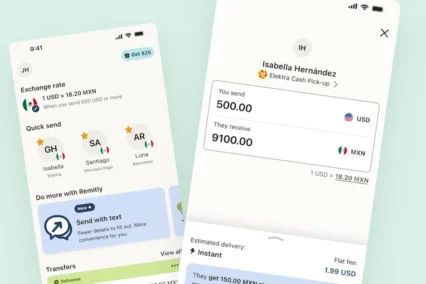
When you edit a transfer, you’ll only see the delivery options available for that specific transfer. Not every destination or transfer supports every delivery method, so choose from the options presented to you.
When can you change the delivery method?

You can change the delivery method only if your Remitly transfer hasn’t been completed yet. Once a transfer is finished, the delivery method can no longer be edited.
To check whether your transfer is eligible, open the relevant active transfer and look for the Edit Transfer option. If it’s available, you can proceed with the steps below. Changing the delivery method doesn’t guarantee a faster delivery — it simply updates how your recipient will receive the funds.
How to change the delivery method in the Remitly app
- Open the Remitly app and sign in.
- Select the active transfer you want to edit.
- Select Edit Transfer.
- Select Edit next to Delivery method.
- Choose the new delivery method.
- Enter your recipient’s delivery details and select Continue.
- Review your changes and select Confirm.
- Your transfer status will change to Update in progress.

How to change the delivery method on Remitly.com
- Go to Remitly.com and sign in.
- Select Transfer History from the menu.
- Choose the active transfer you want to edit.
- Select Edit Transfer.
- Select Edit next to Delivery method.
- Choose the new delivery method.
- Enter your recipient’s delivery details and select Continue.
- Review your changes and select Confirm.
- Your transfer status will change to Update in progress.
What should you check before confirming?
Before you select Confirm, take a moment to double-check a few things:
- Make sure the new delivery method works for your recipient — for example, confirm they have access to the mobile wallet or cash pickup location you’ve selected.
- Ask your recipient to verify the delivery details you’re about to submit, such as account numbers or pickup location information.
- Review the updated transfer information shown on the confirmation screen carefully before you confirm.
Fees, exchange rates, and delivery estimates may or may not change when you update the delivery method, so review the details shown on your screen rather than assuming they’ll stay the same.

What happens after you submit the change?
Once you confirm your change, your transfer status will show as Update in progress. This means your request has been received and is being processed — it doesn’t mean the money has been delivered yet.
Check your transfer in the app or on Remitly.com for the latest status and updated information. If you run into any issues completing the change, visit Remitly Help for further assistance.
Frequently asked questions (FAQs)
Can I change the delivery method after sending money?
Yes, if the transfer hasn’t been completed and the change is available for that transfer. Open the active transfer to check your editing options.
Can I switch from cash pickup to bank deposit?
It depends on the transfer. Check the options available when you edit your transfer — switching between delivery methods like cash pickup and bank deposit isn’t guaranteed for every destination.
Is the delivery method the same as the payment method?
No. The delivery method is how your recipient receives the money, such as bank deposit or cash pickup. The payment method is how you, the sender, pay for the transfer.
Does “Update in progress” mean the money has arrived?
No. “Update in progress” means your requested delivery method change is being processed. It doesn’t confirm that the money has reached your recipient.
What if I can’t find the delivery method I want?
Choose only from the delivery options presented when editing your transfer. If none of the available options meet your needs, visit Remitly Help for further guidance.
Next steps
If your transfer is still active, open it now in the Remitly app or on Remitly.com to see which delivery methods are available. If you’ve already submitted a change, check your transfer status for updates.