


해외 고객에게 즉시 결제를 받으세요
전 세계 프리랜서, 계약자 및 원격 근무자가 간편하게 급여를 요청하고 현지 은행 계좌, 모바일 지갑 또는 Remitly USD 지갑으로 직접 지급받을 수 있는 방법입니다.
전달 옵션은 수령인 위치에 따라 다릅니다.

전 세계 수백만 명이 신뢰하는 글로벌 송금 서비스
전문적인 서비스. 신뢰할 수 있는 서비스.
편리한 서비스.
Remitly 고객의 의견을 반영한 내용으로, 여러분의 고객이 느낄 경험이기도 합니다.

전문가들이 Remitly로 결제를 받는 이유
앱에서 바로 결제 요청
빠르게 결제 요청을 생성하고 고객에게 링크를 공유하세요.
고객을 위한 빠르고 간편한 서비스
고객은 안전한 앱에서 빠르게 계정을 만들 수 있습니다. 결제 요청을 승인하고 완료하면 즉시 지급됩니다.*
모든 결제 한 곳에서 추적
모든 요청 상태(요청됨, 진행 중, 완료)를 고객별로 확인할 수 있습니다.
*송금 소요 시간은 결제 방법, 전달 방법, 거래 검토, Remitly 및 파트너 시스템 상황에 따라 달라질 수 있습니다.
대금 수령 방법을 선택하세요.
내 자금, 내 방식대로.
현지 은행 계좌 또는 모바일 지갑으로 바로 지급받거나, USD로 자금을 보유하고 원하는 환율로 인출할 수 있습니다. 숨겨진 수수료는 없습니다. 수익을 완벽하게 관리하세요.

REMITLY USD 지갑
일은 글로벌하게. 인출은 현지에서.
해외 고객에게 USD로 결제를 요청하고 현지 통화로 인출하세요. 인출 전에 받을 금액을 정확히 확인하세요. 숨겨진 수수료나 환율로 인한 추가 비용은 없습니다.
Remitly USD Wallet not supported in all jurisdictions. Check app for availability. Additional fees and taxes may apply based on factors such as withdrawal method. The total amount does not reflect promotions that may apply. Check your account for applicable rewards. Any rates and fees shown are subject to change. Delivery speed is an estimate dependent on delivery method, transaction review, and system availability of Remitly and our partners.
이용 방법
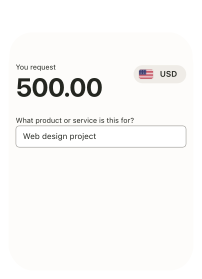
1단계
결제 요청
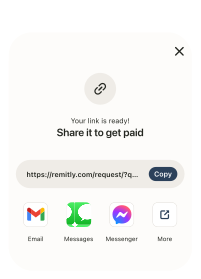
2단계
고객과 링크 공유
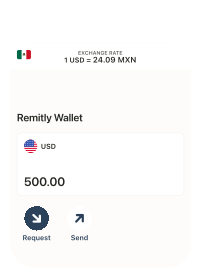
3단계
현지 은행 계좌, 모바일 지갑 또는 Remitly USD 지갑으로 지급받기
시뮬레이션 환경
가입 및 결제 관련 도움받기
Remitly FAQ
해외 고객에게 대금을 받는 프리랜서, 계약자, 개인 또는 사업자는 Remitly 계정을 어떻게 가입하나요?
Remitly는 계좌 개설 비용 없이 빠르고 안전하게 시작할 수 있습니다. 몇 분 안에 고객으로부터 해외 결제를 받을 수 있습니다.
가입 방법:
- Remitly 앱을 다운로드하거나 온라인으로 가입합니다.
- 해외 업무 수당 받기를 선택합니다.
- 이메일과 안전한 암호로 계정을 생성합니다.
- 세부 정보를 확인하고 필요한 경우 유효한 신분증을 업로드합니다.
계정이 설정되면 해외 고객으로부터 은행 계좌, 모바일 지갑으로 직접 결제를 받거나 Remitly USD 지갑에 잔액을 보관하고 원하는 시점에 인출할 수 있습니다. Remitly USD 지갑에서 인출하는 경우, 거주 지역에 따라 다른 전달 옵션이 제공될 수 있습니다. 자세한 내용은 앱을 확인하세요.Remitly를 통해 고객으로부터 결제를 받으려면 어떻게 해야 하나요?
Remitly를 사용하면 프리랜서, 계약자 및 원격 근무자가 해외 고객으로부터 간편하고 투명하게 대금을 받을 수 있습니다.
앱에서 결제 요청 링크를 생성하고 이를 고객과 공유하면 고객은 현지 통화로 결제할 수 있습니다. 결제가 완료되면 은행 계좌 또는 모바일 지갑으로 직접 전달되거나, 숨겨진 수수료나 긴 송금 시간 걱정 없이 일정에 따라 자금을 보유하고 있다가 환전하는 것을 선호하는 경우 Remitly USD 지갑으로 전달됩니다.
Remitly를 이용하면 기존 전신 송금이나 수표보다 더 빠르고 투명하게 해외 결제를 받을 수 있습니다.해외 고객에게 결제를 요청하려면 어떻게 해야 하나요?
Remitly를 통한 결제 요청은 빠르고 간편합니다.- Remitly 앱을 열고 요청을 탭합니다.
- 요청 금액을 입력합니다.
- 결제 요청을 생성하여 고객과 공유합니다.
미국, 캐나다, 영국 고객은 현지 통화로 결제하며, 숨겨진 수수료 없이 은행 계좌, 모바일 지갑 또는 Remitly USD 지갑으로 직접 결제를 받을 수 있습니다.
해외 고객으로부터 간편하고 안전하게 결제를 요청하고 받을 수 있으며, 비용이 많이 드는 전신 송금을 피하고 수익을 직접 관리할 수 있습니다.결제금 수령처는 어떻게 선택하나요?
결제 방법을 설정할 때, 자금을 현지 은행 계좌 또는 모바일 지갑(GCash, Maya 등)으로 직접 받거나, Remitly USD 지갑으로 받아 원하는 환율로 환전하여 사용할 수 있습니다. 수수료와 환율은 결제 확정 전에 미리 확인하실 수 있습니다.
Remitly USD 지갑을 사용하여 수익금을 보유하고 있는 경우, 몇 가지 간단한 단계를 통해 언제든지 자금을 사용할 수 있습니다.- 홈 화면에서 송금하기를 탭합니다.
- 송금 대상으로 본인 또는 다른 사람을 선택합니다.
- 금액을 입력하고 전달 방법을 선택한 다음 수령인 정보를 확인합니다.
- 검토 후 송금하기를 탭합니다.
수수료와 환율은 항상 사전에 표시되므로, 확정하기 전에 정확히 얼마를 지불해야 하는지 알 수 있습니다.고객이 저에게 결제하려면 Remitly 계정이 필요한가요?
네. 고객이 결제를 완료하려면 Remitly 계정이 필요합니다. 이용 방법은 다음과 같습니다.- 결제 요청 링크를 생성하고 공유합니다.
- 고객이 링크를 열고 Remitly 앱을 다운로드한 후 계정을 생성합니다.
- 고객은 결제 요청을 확인하고, 결제 정보를 입력한 후, 현지 통화로 송금합니다.
- 송금액은 현지 은행 계좌 또는 모바일 지갑으로 직접 입금되거나 추후 환전하여 보유하려는 경우 Remitly USD 지갑으로 입금됩니다. 이후 숨겨진 수수료 없이 지원되는 모든 국가에서 인출할 수 있습니다.
누가 Remitly를 통해 결제를 받을 수 있나요?
Remitly는 현재 미국, 캐나다, 영국의 고객과 협업하는 프리랜서와 계약자를 지원합니다.
번역가, 영상 편집자, 가상 비서, 디자이너, 개발자, 컨설턴트 등 어떤 직종이든 Remitly가 빠르고 안전하게 해외 결제를 받을 수 있도록 도와드립니다.Remitly로 입금받을 때 수수료는 얼마인가요?
Remitly를 통해 고객으로부터 결제를 받는 데에는 수수료가 없습니다. 계정 생성도 무료이며, 은행 계좌나 모바일 지갑으로 직접 입금받는 것도 무료입니다. 송금 수수료는 고객이 부담합니다. Remitly USD 지갑을 사용하는 경우, 자금 보관 시에도 수수료가 없습니다. 프리랜서 또는 계약자가 부담해야 하는 유일한 수수료는 Remitly USD 지갑에서 현지 은행 계좌, 직불카드, 모바일 지갑 또는 현금 픽업으로 자금을 인출할 때 발생합니다. Remitly USD 지갑에서 인출하는 방법은 지역에 따라 다를 수 있습니다.
본인 계좌 또는 타인 계좌로 자금을 인출할 경우, 선택한 전달 방법(은행 입금, 모바일 지갑, 현금 픽업)에 따라 소정의 수수료가 부과될 수 있습니다.
모든 수수료는 송금을 완료하기 전에 표시되므로 지불해야 할 금액을 정확히 확인할 수 있습니다.
연중무휴 24시간 고객 지원 가능
스페인어, 타갈로그어 및 16개 언어로 도움을 받을 수 있습니다.

고객 평가 보기
이 페이지에 표시된 고객 후기는 Trustpilot에서 수집한 것으로, 당사 서비스에 대한 각 개인의 경험을 반영합니다. 이러한 후기는 정보 제공 목적으로만 제공되며, 고객 개인의 주관적인 의견입니다. 특정 표현에 대해 당사는 공식적인 입장을 갖고 있지 않습니다. 경로에 따라 개인마다 결과는 다를 수 있으며, 설명된 경험이 일반적인 고객의 경험을 반영하지 않을 수 있습니다.
빠르고 간편하며 안전한 송금
간편하게 결제를 받는 방법
Remitly 앱을 다운받고 결제를 요청해 보세요.
Beyond Borders: Remitly 공식 블로그

프리랜서도 Remitly를 통해 문제없이 송금할 수 있습니다
자세히 읽기 (새 창에서 열림)
해외 프리랜서에게 대금을 지급하는 방법
자세히 읽기 (새 창에서 열림)
프리랜서란 무엇이며, 프리랜서는 어떻게 대금을 받나요?
자세히 읽기 (새 창에서 열림)Remitly, Inc.는 송금 업체 뉴욕주 금융 서비스부, PR(TM-143), MA의 해외 송금 기관 및 RI의 통화 송금 기관으로부터 송금 업체로 면허를 받았습니다. NMLS 번호 1028236.
Remitly Wallet은 자금을 보관할 수 있는 계정이며, 은행 계좌는 아닙니다. Terms and conditions (새 창에서 열림)이 적용됩니다. Remitly는 환전을 통해 수익을 얻을 수 있습니다.
본 문서에 포함된 어떠한 내용도, Remitly 또는 그 계열사가 관련 서비스 제공에 대한 인가나 허가를 받지 않은 관할 지역에서 Remitly의 상품이나 서비스를 사용하도록 제안, 권유, 또는 초대하는 것으로 해석되어서는 안 됩니다. 서비스 이용 가능 여부는 고객의 자격 요건 및 적용 법규 준수 여부에 따라 달라질 수 있습니다. 모든 관할 지역에서 모든 상품이나 서비스를 이용할 수 있는 것은 아닙니다.
Remitly Wallet은 자금을 보관할 수 있는 계정이며, 은행 계좌는 아닙니다. Terms and conditions (새 창에서 열림)이 적용됩니다. Remitly는 환전을 통해 수익을 얻을 수 있습니다.
본 문서에 포함된 어떠한 내용도, Remitly 또는 그 계열사가 관련 서비스 제공에 대한 인가나 허가를 받지 않은 관할 지역에서 Remitly의 상품이나 서비스를 사용하도록 제안, 권유, 또는 초대하는 것으로 해석되어서는 안 됩니다. 서비스 이용 가능 여부는 고객의 자격 요건 및 적용 법규 준수 여부에 따라 달라질 수 있습니다. 모든 관할 지역에서 모든 상품이나 서비스를 이용할 수 있는 것은 아닙니다.