
Key Highlights
Here are the key takeaways from this guide:
-
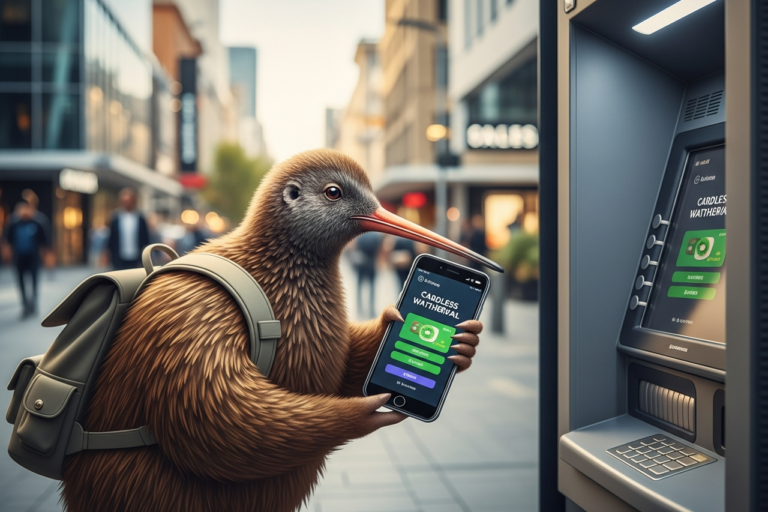
Cardless cash withdrawal is a safe way to get money from a New Zealand ATM. You do this by using your mobile banking app instead of a debit card.
-
Big banks like ANZ, ASB, BNZ, and Westpac let you use this feature. But, not every ATM in New Zealand has this option.
-
This way can be more secure. It lowers the risk of your debit card details being stolen by skimming devices at an ATM.
-
It is easy to set up in your banking app. The app gives you a code to use at an ATM for cash withdrawal.
-
Cardless withdrawals have fees and day limits, just like when you use your card.
Introduction
Have you ever needed some cash but then found out you left your wallet at home? This can happen to anyone. The good news is that the right technology can help you out. Now, it is easier in New Zealand to get money from an ATM even when you do not have your debit card with you. In this guide, we explain how cardless cash withdrawal works. We also talk about which banks have this feature. You will learn how you can use this easy and safe way to get cash when you need it. This will help you get quick access to your money using new ways with your ATM and debit account.
Understanding Cardless Cash Withdrawal in New Zealand
Think about when you need cash from an ATM but don’t have your debit card with you. Cardless cash withdrawal helps with this. This is a feature some banks now offer. It lets you get cash using your mobile banking app instead of your debit card.
This new way to get cash is safe. It is also easy to use, and works well if you forget your wallet at home. Let’s look at how this works and what good things it brings for people in New Zealand.
What is cardless ATM access and how does it work?
Cardless ATM access lets you get cash from an ATM even if you don’t have your debit or credit card with you. You just need your smartphone and your bank’s mobile banking app to start. This way, you can use a digital tool for your cash needs.
Here is how the process works. First, you open your mobile banking app and tap the cardless withdrawal option. Your app will show a special code. It might also give you a PIN to use for a short time.
At the ATM that works with this, pick the cardless transaction option on the screen. Then, type in the special code from your app. This lets the atm check it is you, and allows it to give you the cash. The process is safe and easy.
Benefits of using cardless withdrawals for Kiwis
Choosing cardless withdrawals gives you some clear upsides compared to old ways. The big one is better safety. You do not put a debit card or credit card into the machine, so skimming devices can not grab your personal information.
This way is also really handy. If you lose your wallet or your card, you still get to your cash if you have your phone on you. It is a good thing to have in case you end up in a tight spot.
Here are some top reasons people use it:
-
Less chance of being hit by skimming devices or losing your personal information.
-
Handy when your debit card or credit card is not with you.
-
Quick and simple transactions that start right from your smartphone.
-
All transactions get extra cover by the mobile banking app and its security features.
Banks in New Zealand That Offer Cardless ATM Withdrawals
In New Zealand, more people are starting to use cardless ATM technology. Some top banks are now making this feature ready for their customers. If you bank with one of the biggest banks, you might be able to use this. But not every bank has this service yet.
You should check if your bank lets you take money out without a card at an ATM, and find out which of their machines have this feature. The sections below will show which big banks in New Zealand let you use cardless ATMs.
Major banks with cardless ATM features (ANZ, BNZ, ASB, Westpac)
Several of New Zealand’s largest banks, including ANZ, BNZ, ASB, and Westpac, have embraced cardless ATM technology. Each bank has its own app and system for facilitating these transactions, making it accessible to a large number of Kiwis.
While these banks offer the service, the specifics can vary. For example, the daily withdrawal limits and the exact steps to generate a code might differ slightly from one bank’s app to another. It’s always best to familiarise yourself with your own bank’s process.
Here’s a quick look at the availability:
|
Bank |
Cardless ATM Feature |
|---|---|
|
ANZ |
Yes |
|
ASB |
Yes |
|
BNZ |
Yes |
|
Westpac |
Yes |
Availability of cardless ATM services across the country
Most of the big banks in New Zealand let you take out cash without a card, but not every ATM can do this yet. You will mostly find ATMs that offer cardless cash withdrawal in large cities and main towns. These are often at bank branches and busy shopping spots.
To make sure you don’t waste a trip, you should use your bank’s ATM locator tool before you go out. You can find this on your bank’s website or in the app. The tool lets you see which ATMs can do cardless cash withdrawal.
Banks are working to add the new feature to more of their ATM machines. For now, you should plan ahead to be sure you can get cash when you need it, without your card, in New Zealand.
Setting Up Cardless Cash Withdrawal with Your Bank
Getting started with cardless cash withdrawal is easy and you can do it from your smartphone. You will need your bank’s mobile banking app on your phone. You must also be set up for internet banking. There is no need to get a registration number, just use your usual login.
The steps in the app are made to be clear and simple. The app will show you what you need to do for cash withdrawal. The next parts will tell you more about how to register and get ready for your first cardless cash withdrawal.
Registering with your NZ banking app or internet banking
To use cardless withdrawal, first make sure you have set up your bank’s digital services. You need to have an active internet banking profile. You also need your bank’s mobile banking app on your smartphone.
When you set up the app, you will link it to your bank accounts. You will do this by putting in your internet banking login details so the app can check who you are. You do not need a separate registration number just for the cardless feature. It is already part of the mobile banking app and the main experience.
Once you can see your bank accounts in the app, you are ready. You will find the cardless withdrawal option in the app’s menu. You can use this function any time you need to.
Step-by-step guide for cardless withdrawal setup (ANZ, BNZ, ASB, Westpac)
Setting up cardless withdrawal is easy with big banks like ANZ, BNZ, ASB, and Westpac. You do it all in the mobile banking app for your bank. While each app may use different button names, the steps you need to follow are nearly the same for each one.
First, use your mobile banking app and log in. Next, look for the part of the app where you can do cardless cash deals. In some apps, this can be called “Cardless Cash,” “Get Cash,” or another name that is a lot like that.
Here are the basic steps you will go through in your app:
-
Download and log in to your bank’s mobile banking app.
-
Find the cardless withdrawal option, often in the main menu or under account services.
-
Pick the account you want to use and choose the amount.
-
Follow the instructions to get a special withdrawal code and a PIN.
How to Use Cardless ATM Withdrawals
When you have your cash withdrawal code on your smartphone, you can go to an ATM that works with this system. Using the ATM is quick and easy. It helps you get your cash without any trouble. With this cardless cash withdrawal option, your smartphone works like a key to get your money.
The process to get your cash is clear, but it’s good to know what happens at the ATM. Let’s go through the steps for starting the cash withdrawal and what is done to keep it safe.
Initiating a cardless cash transaction at an ATM
When you get to an atm that works with your bank, the first thing to do is touch the screen or press a button to start. You don’t have to put your debit card in. Instead, look on the screen for an option like “Cardless Withdrawal” or “Cardless Cash.”
After you choose this, the atm will ask you for some numbers that you can get from your mobile app. This is often a long code or voucher number. The atm might also need a special PIN from the app for extra safety.
Once you put in the right details, the atm will check with your bank. If the number and PIN are correct, the machine will give you your cash withdrawal. Your transaction is done. Just keep in mind that these codes from the app run out fast, often within 30 to 60 minutes.
Security steps and verification for cardless access
Security is very important when you use cardless withdrawals. There are a few layers set up to keep your account safe. One big plus is that you don’t have to worry about skimming devices, since you are not using a card at all. This makes it a better way to keep your personal information safe when you are at an ATM.
The check process for your account is strong. You need to log in to your mobile banking app first. You will have to use your password, a PIN, or even your fingerprint. This means only you can get into your app and start a withdrawal with your smartphone.
Here are the main steps for security and checking:
-
You need to log in to your mobile banking app on your smartphone.
-
You will get a special one-time-only withdrawal code that only works for a short time.
-
Sometimes, you will also need to use another PIN at the ATM as a second check.
-
Every step is saved by the system, so there is a clear record.
Fees, Limits, and Security of Cardless ATM Withdrawals
Just like when you use a regular ATM, you need to know about any costs or rules with cardless withdrawals. Banks can charge atm fees for using the atm, and there will be a daily limit on how much money you can take out. These rules help keep your money safe and also help the bank manage cash.
If you know these things, you can use the atm service in a better way and avoid any surprises. Let’s talk about the usual atm fees, how much you can take out each day, and if this method is as safe as using a real card.
Cardless transaction fees and withdrawal limits in New Zealand
When you use cardless withdrawal, you might have to pay some atm fees. These fees are often much the same as usual atm fees. If you go to an atm that is not your own bank, you could be charged a standard fee. What fee you pay can also depend on the account type that you have. But, if you use a cardless atm from your own bank, there is usually no fee.
Most banks set a daily limit on how much money you can take out with cardless withdrawal. This is to keep your account safe. The daily limit for cardless is sometimes less than what you get with a real card. For example, ANZ has a $2,000 daily limit for ATMs when you use a card. For cardless withdrawal, the limit is often about the same.
Key things about atm fees and limits are:
-
Fees might be charged if you use an atm that is with another bank.
-
There is a daily limit on how much you can take out.
-
Limits are not always the same at every bank and they may not match your card’s limit.
-
You should read your bank’s terms for clear info on your account type.
Security features compared to physical card withdrawals
Cardless withdrawals are safer than using a debit card. The best part is that you remove the risks from the ATM’s card slot, like data theft from hidden skimming devices or getting your card trapped. Your personal information is not out in the open at the ATM.
The cardless process needs more than one check to work. You must open your secure mobile banking app and then use a one-time code that runs out fast. This two-step set-up makes it very hard for someone else to get your money, even if they get your phone.
If someone steals your debit card and PIN, they can use them again and again until you stop the card. With cardless withdrawals, the code you get works for only one time. This way keeps your mind at peace. It also follows rules set by the Financial Conduct Authority.
Common Issues and Helpful Tips
While cardless cash withdrawal is often easy, there could be times when you face a problem, like a transaction error at the ATM. It helps to know what to do in these cases. This will save you both time and stress. A good tip is to check all your details before you hit confirm.
If your transaction does not work, don’t worry. There are some simple steps you can follow to fix it. In this page, we talk about what to do if you get an error and some advice for people from other countries who want to use an ATM in New Zealand for cash withdrawal.
What to do if a cardless withdrawal fails
If your cardless cash withdrawal does not work, do not worry. Many times, the reason is small, like a mistake when putting in the code or the code has stopped working. The code for the cash withdrawal from the app at the atm is usually only good for a short time, so check if you can still use it.
If the atm shows an error message, write it down. This can help if you have to talk to the bank. In many cases, you can fix this by making a new code from your banking app and trying to take money out again.
If you are still not able to get your money, do these things:
-
Double-check you are at an atm that works with cardless cash withdrawal.
-
Make sure your phone has a strong internet connection to get the code.
-
Look if you have enough money in your bank account for the cash withdrawal.
-
If you still have the problem, call your bank’s customer service team for help.
Cardless ATM access for international visitors
For people visiting from other countries, you can’t use cardless withdrawal features in New Zealand. The cardless services are just for local NZ bank accounts and the bank’s own mobile apps. If you have an international card, like one from Bank of America, it will not work with the cardless systems at NZ banks.
You will have to use your actual debit card, such as your Visa debit card, to get local currency from an ATM. When you use your debit or visa card, check the exchange rate that you get. It is better to choose to pay in the local currency, New Zealand dollars (NZD). This lets you skip the poor rates you often get with Dynamic Currency Conversion.
Some banks, like Westpac, work with Bank of America, and there are global ATM partnerships that can save you money on some fees. But these savings only work when you use your physical card, not for cardless features. Right now, cardless ATM access is only for customers with New Zealand bank accounts.
Conclusion
To sum up, cardless cash withdrawals give people in New Zealand an easy and safe way to get their money without using a card. If you know how this works and set it up with your bank, such as ANZ, you can take out cash from ATMs all over the country with no trouble. The big banks in New Zealand, like ANZ, BNZ, ASB, and Westpac, offer this service, and the steps you need to follow to start are easy. Make sure you know about the fees, the limits, and the safety steps that come with these transactions so you have a good experience. If you want to make your banking simpler, contact someone for a free chat to find out more about cardless withdrawal options in New Zealand.
Frequently Asked Questions
Are cardless ATM withdrawals available at all ATMs in New Zealand?
No, cardless cash withdrawal is not at all ATMs in New Zealand. The main banks like ANZ and ASB do offer this, but you can only use it at their newer or updated ATMs. It is a good idea to check your bank’s ATM finder to look for one that will work before you go out to get cash.
Which mobile apps support cardless ATM withdrawals in New Zealand?
The main banks in New Zealand, such as ANZ, ASB, BNZ, and Westpac, have their own mobile banking apps. These apps let you take out money without your card. To use this, you need to download the app for your own bank on your smartphone. You cannot use another bank’s app to get into your account.
Can you withdraw cash without a card using a foreign bank or international card?
No, people from other countries are not able to use cardless cash withdrawal in New Zealand. The banks here link this service to local NZ bank accounts only. To take out cash, you must use your physical international card. For example, you can use your Bank of America Visa. Always pick local currency for your cash withdrawal. This way, you can get a better exchange rate.