

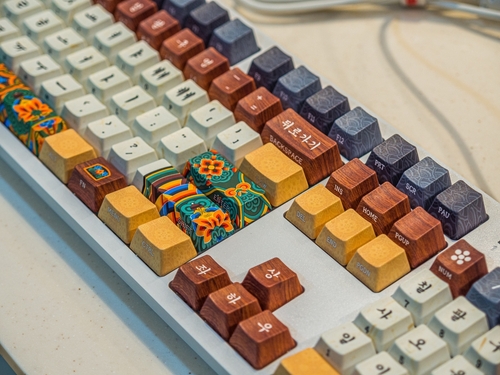
Korean culture is capturing attention globally. From K-pop and K-dramas to competitive gaming, the influence of South Korea is everywhere. The Hallyu Wave — the term for the rising global popularity of Korean culture — has been recognised as spreading from Japan and China to Southeast Asia, before reaching the rest of the world, and its current iteration is increasingly fan-driven. This growing interest has introduced many people to new tools, including Korean keyboards. You might have seen them featured in aesthetic desk setups online or used by your favourite esports players.
This guide is designed to help you understand how Korean keyboards work. We will clearly explain what makes them different from standard keyboards. This is not a product review. Instead, it is a practical overview to help you decide if one is right for you.
Whether you are a New Zealand buyer wanting to upgrade your desk setup, a student learning the language, or a mechanical keyboard enthusiast, having the right information is essential. We will cover the layout, the software, and what you need to consider before ordering one from overseas.
What Is a Korean Keyboard?
A Korean keyboard is designed specifically for typing Hangul, the Korean alphabet. Most of these keyboards feature a dual-language layout. This means they display both English letters and Korean characters on the keycaps.
Physically, a Korean keyboard looks very similar to the standard keyboard you already use. The underlying hardware is often identical to a traditional English keyboard. The main differences lie in the printed legends on the keys and the input method used by your computer to process the keystrokes.
The Hangul Layout Explained
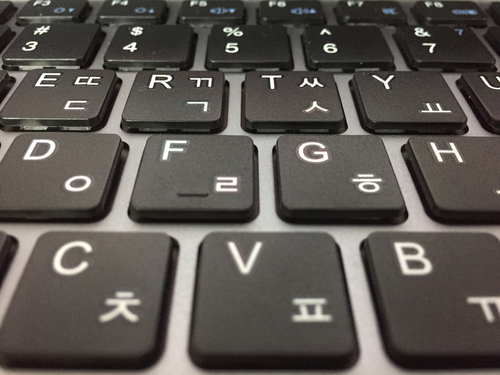
Typing in Korean is a unique experience. Hangul is built on a highly logical system. Consonants and vowels combine to form complete syllable blocks. When you type on a Korean keyboard, you are building these blocks piece by piece on your screen.
The standard layout used in South Korea is the 2-set (두벌식) layout. In this setup, consonants are generally placed on the left side of the keyboard, while vowels sit on the right. This allows you to naturally alternate between your left and right hands as you build syllables.
Typing Hangul feels quite different from typing in English. You are not just placing one letter next to another. Your computer’s software actively groups the letters into a single block as you type. Once you understand the consonant-vowel flow, the 2-set layout becomes highly intuitive.
Physical Design Differences
Korean keyboards stand out visually. The most obvious difference is the keycap legends. You will see crisp Korean characters printed right alongside the standard Latin letters.
The design aesthetics of Korean keyboards are highly regarded. Many feature clean, minimalist designs. You will often find pastel colour palettes or charming themes that elevate a standard workspace.
Size and layout standards are another important factor. Most Korean keyboards use the standard ANSI layout. In many English-speaking countries — including New Zealand — people have traditionally used the US keyboard layout despite their orthography conforming more closely to British English. That said, some local keyboards do use the ISO standard. The key visual difference is that ANSI keyboards feature a wide, horizontal Enter key, while ISO keyboards have an L-shaped Enter key spanning two rows. Aside from a few subtle extra markings on the spacebar row for language switching, the physical shape of the keys on a Korean keyboard remains completely familiar to ANSI users.
Input Methods and Software Considerations
You do not actually need a Korean physical keyboard to type in Korean. Your computer’s operating system can handle language switching effortlessly. Windows and macOS both allow you to add Korean as an input language.
So, what does a physical Korean keyboard add? It provides essential visual guidance. Seeing the characters on the keys helps you type faster and reduces mistakes.
When you type in Korean, your computer uses an Input Method Editor (IME). The IME is the software that automatically combines the individual consonants and vowels you type into complete syllable blocks. Switching back and forth between English and Korean is simple. Most systems use a quick keyboard shortcut, like the right Alt key, to swap languages instantly.
Why Korean Keyboards Are Popular Beyond Korea
The demand for Korean keyboards reaches far beyond South Korea. In New Zealand, Korean popular culture arrived sooner than many might expect, aided by strong diplomatic and trade ties between New Zealand and South Korea, as well as New Zealanders who taught English or worked in Korea. Fans naturally want to connect with the culture by learning the language and using the same tools as their favourite stars.
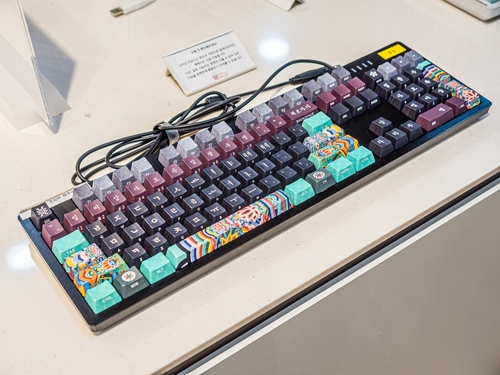
Aesthetic appeal is a major driver of this popularity. The minimalist and “cute” design trends originating in Korea are highly sought after for modern desk setups.
The mechanical keyboard community also plays a significant role. South Korea is home to several premium mechanical keyboard brands and a thriving custom keyboard scene. Enthusiasts around the world seek out these high-quality boards for their superior typing feel. Additionally, language learners find that having the physical characters on the keys greatly helps with memorisation and daily practice.
Things NZ Buyers Should Know Before Getting One
Buying a keyboard from overseas requires a bit of planning. Because Korean keyboards are a niche product in New Zealand, they are rarely stocked in local electronics stores. You will likely need to import one. In fact, only around six keyboard retailers in New Zealand carry mechanical keyboard parts and accessories, highlighting just how limited local stock can be.
When importing, you should factor in shipping costs and wait times. It is important to know the total cost upfront to avoid any surprises.
You must also consider layout compatibility. As mentioned earlier, most Korean keyboards use the ANSI layout. If you are used to the New Zealand/UK ISO layout — which features a tall, L-shaped Enter key — an ANSI keyboard will take a little getting used to.
Warranty and support can be challenging. Returning a faulty keyboard to an international seller is often expensive and time-consuming. Because of the niche demand, you might also find that these keyboards are slightly more expensive than standard models.
If buying a full imported keyboard feels like too much of a hassle, there is a simple alternative. You can purchase a set of Korean keycaps on platforms like Etsy NZ and install them on your current mechanical keyboard.
Common Misconceptions
There is plenty of confusion surrounding foreign language keyboards. Let’s clear up a few common myths.
First, many people believe you need a Korean keyboard to type Korean. This is false. Any standard keyboard can type Korean once you change your operating system settings.
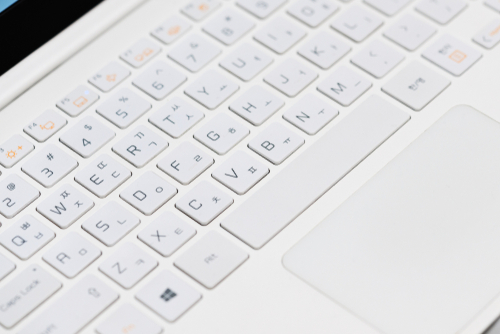
Second, some assume Korean keyboards use completely different hardware. They generally do not. Beneath the keycaps, the switches and circuits are standard.
Finally, people think these keyboards are only for fluent Korean speakers. This is simply not true. Language learners, designers, and keyboard enthusiasts all use and enjoy them daily.
Who Should (and Shouldn’t) Consider One
A Korean keyboard is an excellent fit for certain types of users.
Good fit for:
- Korean learners: The printed keycaps act as a fantastic training tool for memorising the Hangul layout.
- Keyboard hobbyists: Enthusiasts will appreciate the high build quality and unique aesthetics found in Korean mechanical boards.
- Fans of Korean design: If you love clean, pastel, or minimalist desk aesthetics, these keyboards deliver.
Maybe not for:
- Users needing a specific NZ ISO layout: If you rely on a large Enter key and specific symbol placements, the ANSI layout might frustrate you.
- People wanting plug-and-play simplicity: If you do not want to deal with international shipping, wait times, or changing operating system language settings, a standard local keyboard is a safer choice.
Frequently Asked Questions (FAQs)
Can I use a Korean keyboard for everyday English typing?
Yes. A Korean keyboard functions exactly like a standard English keyboard when your computer is set to English. The English letters are printed on the keys, and the layout for typing in English is identical to a standard QWERTY board.
How do I switch between English and Korean while typing?
Most operating systems allow you to switch languages easily. On Windows, you can usually press the right Alt key (often labelled specifically for this purpose on Korean keyboards) or the Windows Key + Spacebar. On a Mac, the Caps Lock key or Control + Spacebar is often used to toggle input methods.
Do I need special software to use one in New Zealand?
No special third-party software is required. Both Windows and macOS have built-in Korean language support. You simply need to go into your system settings, add Korean as a language, and the built-in Input Method Editor (IME) will do the rest.
Making the Right Choice for Your Desk Setup
Korean keyboards offer a unique blend of language functionality and beautiful design. The hardware is familiar, but the keycap legends and the software input method create a distinct typing experience. Their cultural and aesthetic appeal makes them a standout addition to any workspace.
Before making a purchase, consider your daily typing habits. Think about the layout you prefer and whether you are comfortable ordering from an international seller. Understanding these details ensures you can buy with confidence and choose a tool that truly enhances your daily routine.